
After the first 7 days of an AI-assisted Amazon PPC campaign, sellers often want a quick verdict. Did ACOS improve? Did sales move? Did AI make the right calls? Those are fair questions, but a 7-day review should not be treated as a pass-or-fail judgment.
A better first review starts with direction: what changed, whether those changes match the campaign goal, and what should be watched next. The first 7 days are closer to an operations check than a final performance report.
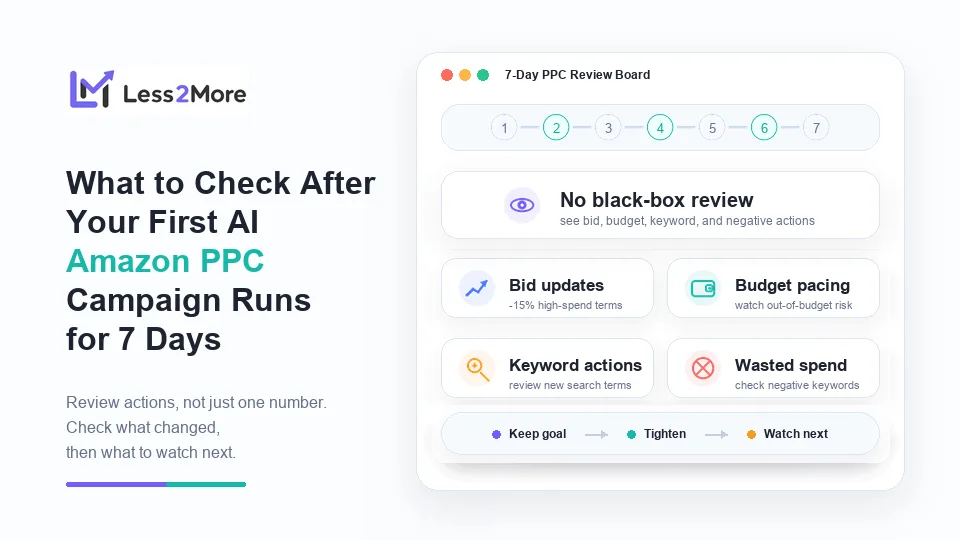
For many experienced sellers, the biggest concern is not only whether AI can optimize. It is the fear of losing control: waking up to wasted spend, an out-of-budget campaign, or broad keyword expansion that no one reviewed. A black-box AI workflow makes that fear worse because sellers cannot easily see what changed.
That is why the first 7-day review should not focus on one number alone. It should connect the campaign goal, early data, and AI adjustment records.
The Rules: Why a 7-Day Review Should Not Rely on One-Day ACOS
ACOS matters, but one-day ACOS can be misleading. A campaign may spend before conversion data catches up. A product may receive clicks on one day and sales later. When click volume is low, early metrics can also move sharply.
The deeper reason is Amazon's attribution logic. For Sponsored Products, Amazon commonly uses a 7-day attribution lookback for sales, and sales metrics can take time to populate. A click from earlier in the week may still affect attributed sales later, while very recent clicks may not have had enough time to convert.
That means sellers should separate operational review from final performance judgment. ACOS can be reviewed, but it should not be the only reason to change direction. After 7 days, the more practical question is whether AI has been handling the right PPC work around the seller's goal.
The 7-Day Checklist
The checklist below turns “how did it perform?” into a more actionable review. Each area should answer three questions: what happened, does it fit the campaign goal, and what should the seller do if it does not?
1. Monitor Bid Updates
Start by checking which bids were updated during the week and whether those changes match the campaign goal. If the campaign needs more reach, some bid increases may be reasonable. If the goal is tighter spend control, high-spend terms deserve closer review.
Less2More helps by keeping bid changes recorded, so sellers do not need to manually track every small bid movement each day. The records show what changed, without asking the seller to return to full manual bid management.
If bids look too aggressive for a control-focused campaign, tighten the guardrails and review high-spend keywords in the next cycle. If bid updates match the goal, keep the goal in place and monitor the next review period.
2. Analyze Budget Pacing
Budget pacing determines whether a campaign can collect data consistently. After 7 days, sellers should check whether the campaign went out of budget too early, spent too quickly, or used budget too slowly to gather useful signals.
In Less2More adjustment records, budget-related changes can be reviewed against the campaign's role. A launch campaign may need enough budget to collect search term data. A mature product may need a more stable spend rhythm. A limited-budget campaign may need tighter pacing to avoid uneven spend.
If budget pacing looks wrong, the next step is not simply to increase spend. First review the daily budget, campaign priority, and pacing expectation. If the campaign keeps stopping too early, decide whether the issue is budget level, traffic breadth, bids, or keyword expansion.
3. Review Keyword Extensions
Keyword expansion should be reviewed for relevance, not only for volume. After 7 days, sellers should check whether new keywords came from relevant search terms, fit the product, and support the original campaign goal.
Less2More lets sellers review which keywords were added, making it easier to see whether AI is handling recurring keyword review work. For discovery campaigns, relevant long-tail terms may be useful early signals. For efficiency-focused campaigns, expansion should stay more controlled.
If keyword additions are too broad, slow down expansion and watch whether new terms match the product's buyer intent. A keyword addition is not automatically good or bad. It should be reviewed against the campaign goal, product relevance, and search term behavior.
4. Audit Negative Keyword Actions
Negative keyword actions can help reduce wasted spend and prevent budget from continuing to flow into clearly irrelevant or non-converting terms. But first-week data can still be limited, so sellers should also avoid excluding potentially useful traffic too early.
Less2More negative keyword records show how low-intent traffic is being handled over time. Sellers can review which negative keywords were added and whether those exclusions fit the product and campaign direction, without digging through every campaign manually.
If the campaign is bleeding budget on non-converting terms, review search terms and negative keyword actions before increasing spend. If negative keywords look too strict, check whether valuable traffic may have been excluded too early.
Case Study: A Kitchen Product Campaign With a $200 Test Budget
A seller launches a new kitchen product with a weekly PPC test budget of about $200. Before starting AI assistance, the seller sets a practical goal: collect early search term data, keep spend within a defined limit, and avoid bleeding budget on clearly non-converting terms.
After 7 days, the campaign has spent about $145. Instead of judging the campaign only by early ACOS, the seller reviews the adjustment records. They see that two broad, high-spend terms had bids lowered by about 15%, one relevant long-tail search term was added as a keyword, and three clearly irrelevant terms were added as negative keywords.
The seller also checks budget pacing. The campaign did not go out of budget early every day, and the added keyword is still relevant to the product. That does not prove the campaign is already fully optimized, but it gives the seller a practical next step: keep the goal unchanged for another review cycle, watch the new keyword, and monitor whether the bid reductions reduce wasted spend without cutting useful traffic.
Conclusion & Next Steps
After the first 7-day review, sellers should leave with a simple decision rule: if the direction matches the goal, keep running; if actions move away from the goal, adjust the guardrails; if the signal is still early, define what to watch next week.
That is the real value of a 7-day review. It does not ask sellers to manually control every PPC detail again. It creates a repeatable review rhythm: the seller sets the goal, AI manages repetitive PPC work, and the seller reviews adjustment records to confirm whether campaign operations still match the intended direction.