
Before using Less2More AI Ads for the first time, you need to complete two authorizations: Selling Partner API (SP-API) and Amazon Advertising API. Once both are connected, the system will sync your data so you can start creating AI Ads.
Where to Start
- First-time Onboarding: if you haven't authorized any marketplaces yet, the system will guides you to the authorization page during your first login.
- Manage Marketplaces: navigate to Manage Stores from the top-right menu to use actions like Authorize, Reauthorize, or Connect.
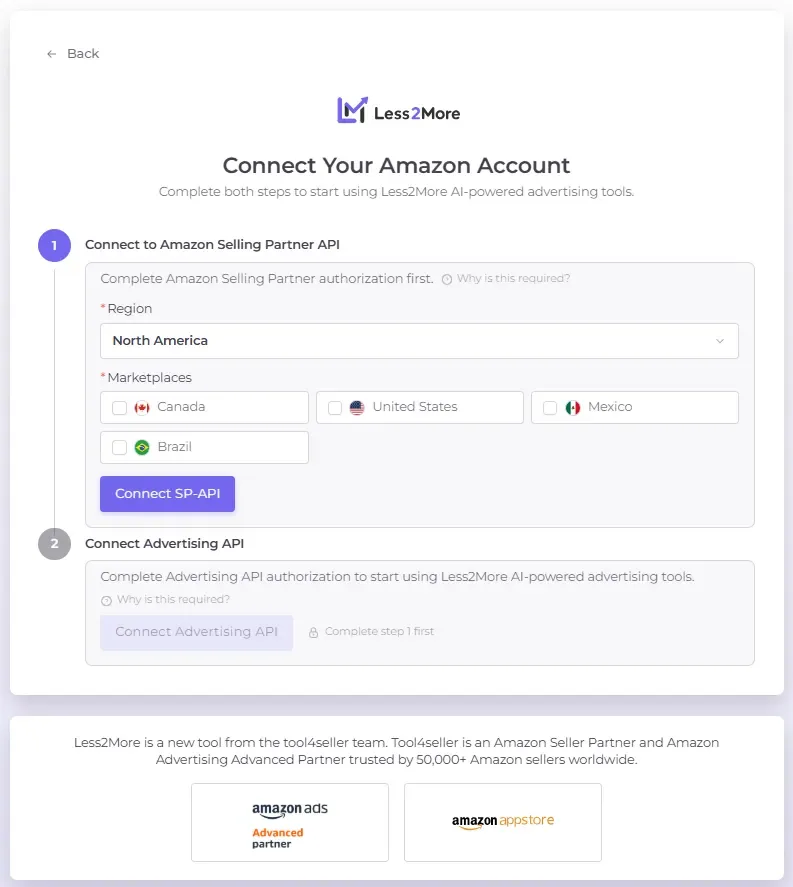
Authorization Order
Step 1: Connect SP-API
- Select Region: North America, Europe, or Far East (Asia-Pacific).
- Select Marketplaces: you can select multiple selections within the same region.
- Authorize: click Connect SP-API and complete the process in the Amazon popup window.
- Verification: after success, the status will change to Connected with a timestamp
Step 2: Connect Advertising API
- Unlock Button: this button remains disabled until you complete Step 1.
- Authorize: click Connect Advertising API and complete the Amazon authorization popup.
- Verification: after success, the status will change to Connected with a timestamp.
Data Synchronization
Upon your first successful connection, the system will display "Loading Data from Amazon." Initial synchronization typically takes 30-60 minutes. You can start creating AI Ads once the sync is complete.